
Capacitive vs Resistive Touch Screen: The Ultimate 2026 Comparison Guide
News
Mar-17-2026
Choosing between a capacitive touch screen vs resistive touch screen is the most critical decision in hardware interface design. While capacitive screens dominate the consumer world, resistive screens remain vital for specific industrial niches. This guide breaks down the technical mechanics, costs, and real-world performance to help you select the right display technology.
Capacitive touch screen vs resistive touch screen: What is the main difference?
The primary difference lies in how they detect input: capacitive screens use the electrical properties of the human body, while resistive screens rely on physical pressure. Capacitive screens offer multi-touch and high clarity. Resistive screens are pressure-sensitive, allowing for use with any stylus, tool, or heavy glove.
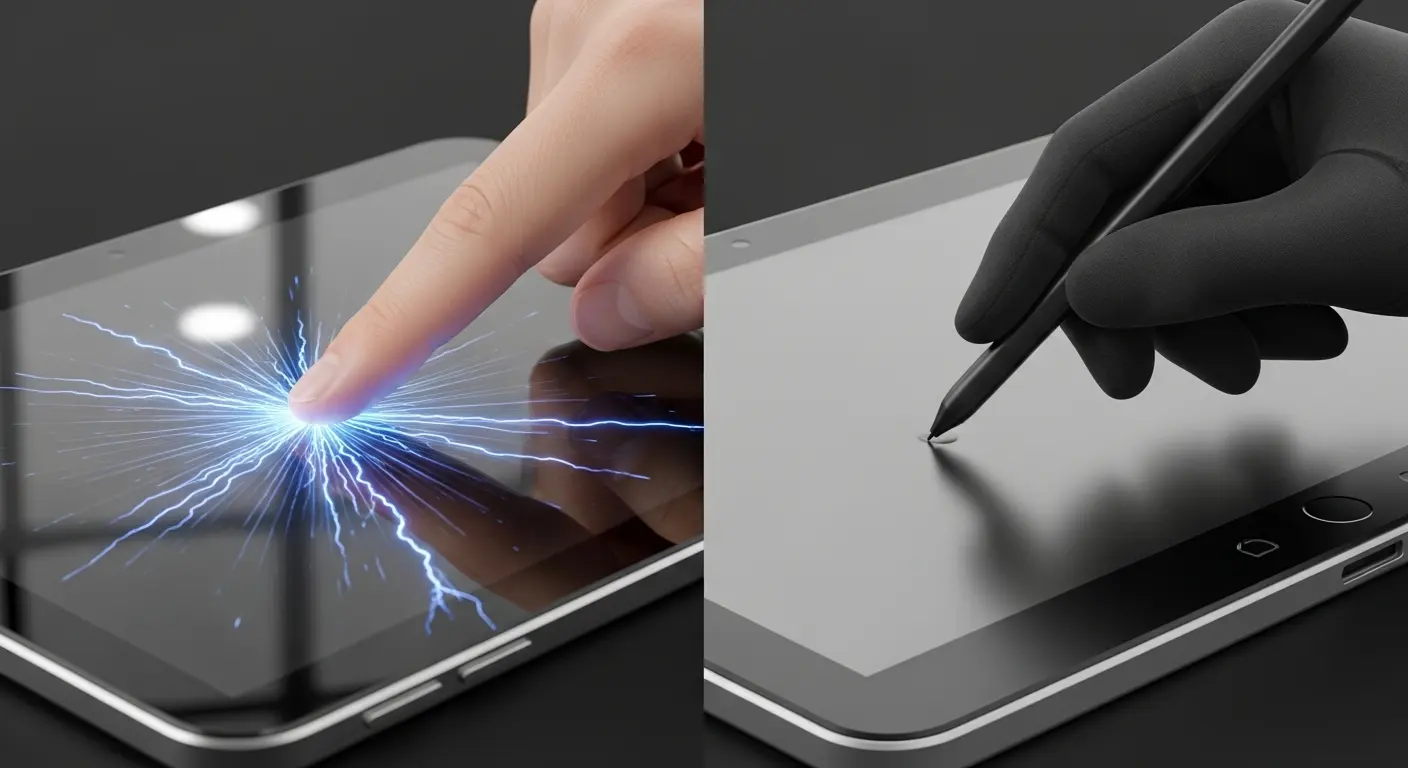
| Feature | Capacitive Touch Screen | Resistive Touch Screen |
| Input Method | Conductive (Finger/Special Stylus) | Any object (Finger, Glove, Pen) |
| Multi-Touch | Supported (up to 10+ points) | Generally Single-Touch |
| Durability | High (Glass-based) | Moderate (Plastic layers) |
| Clarity | Excellent (approx. 90%+) | Moderate (approx. 75-80%) |
| Cost | Higher initial cost | Lower initial cost |
| Environment | Clean, indoor, or light industrial | Harsh, dusty, or heavy industrial |
When we evaluate a capacitive vs resistive touch screen, we look at the "User Intent." In my experience consulting for medical device manufacturers, the shift toward capacitive has been nearly universal. Users now expect the fluid, "iPhone-like" experience everywhere. However, if you are designing a control panel for an oil rig where operators wear thick leather gloves, the resistive screen is often the safer, more reliable bet.
How does a capacitive touch screen function?
A capacitive touch screen works by detecting changes in an electrostatic field. A transparent conductor, usually Indium Tin Oxide (ITO), sits behind a glass layer. When a finger touches the glass, it draws a tiny amount of electrical charge to the point of contact, which the controller then processes as a coordinate.
To truly understand this, one must look at what is a capacitive touch screen at a molecular level. Most modern devices use "Projected Capacitive" (PCAP) technology. This uses a grid of sensors that can "project" the field through thick protective glass.
Tip: If your device will be used outdoors, ensure your capacitive controller is tuned for "water rejection." This prevents raindrops from being registered as false touches.
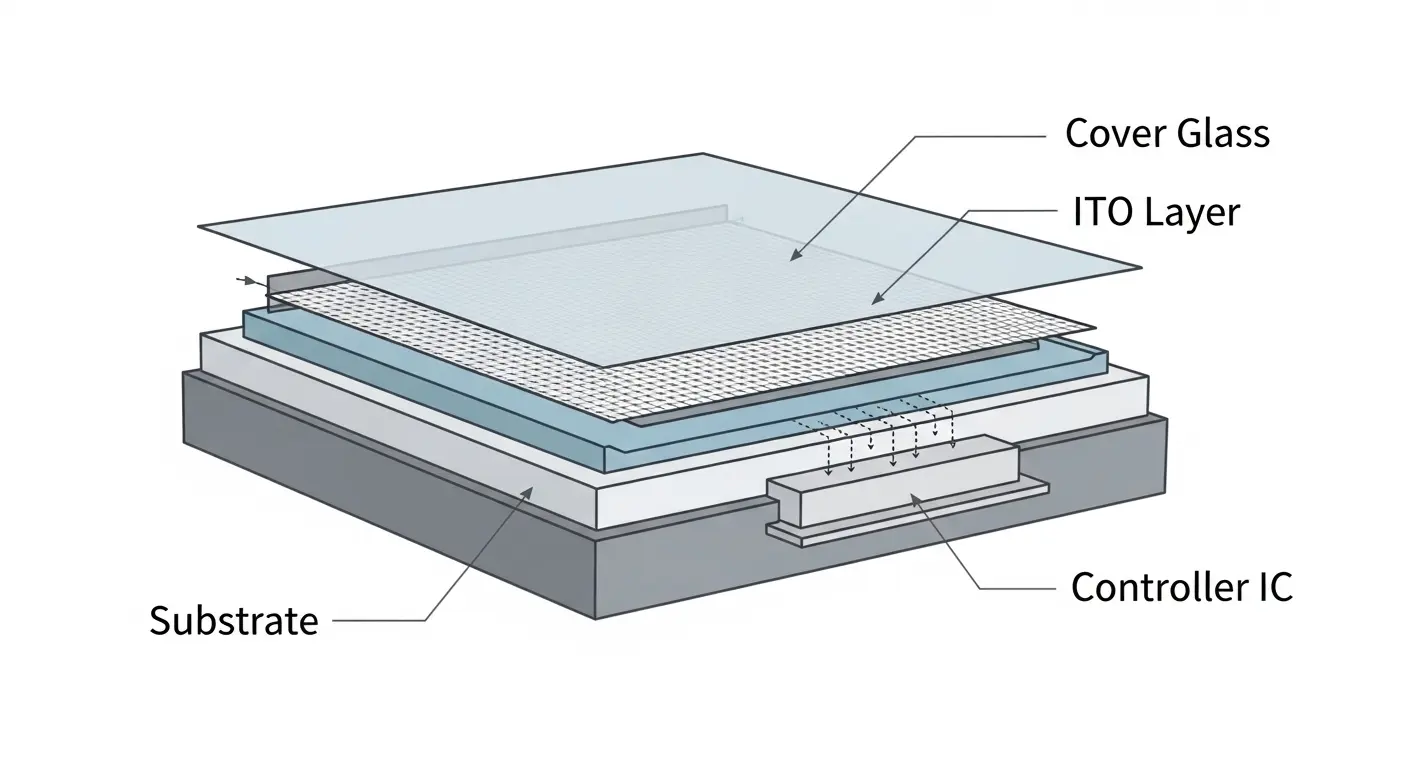
During a recent field test for a marine navigation system, we found that high-quality PCAP sensors could actually distinguish between a human finger and salt spray. This level of sophistication is why many engineers look for the advantages of capacitive touch screens when high precision is required.
How does a resistive touch screen work?
Resistive touch screens consist of two flexible layers separated by a small air gap or "spacer dots." When you press the top layer, it physically touches the bottom layer, completing a circuit. The controller measures the change in resistance at that specific point to determine the touch location.
This technology is inherently mechanical. Because it relies on pressure, it does not care if you are using a finger, a gloved hand, or a plastic pointer. In older automotive GPS units or grocery store checkout pads, this was the standard.
- Top Layer: Typically a flexible polyester (PET) film with a conductive coating.
- Air Gap: Microscopic dots that keep the layers apart when not in use.
- Bottom Layer: Usually a rigid glass or acrylic base with a matching conductive coating.
The "resistive" nature means these screens are less clear than capacitive ones. The extra layers and the air gap cause light reflection and refraction. If you've ever struggled to see a screen in direct sunlight, it was likely an older resistive model.
What are the capacitive vs resistive pros and cons?
Capacitive screens win on clarity and responsiveness but fail with standard gloves. Resistive screens work with everything and are cheaper but wear out faster due to physical flexing. Choosing between them requires balancing user experience against the physical environment and the total project budget.
The capacitive vs resistive pros and cons often come down to the "Cycle Life."
Capacitive Pros:
- Durability: The top surface is glass. It is virtually immune to scratches from fingernails or pens.
- Optics: Without the air gap and plastic film, colors are more vibrant and text is sharper.
- Gestures: Essential for modern UI. Swiping and pinching require the multi-touch capabilities of capacitive tech.
Resistive Cons:
- Fragility: The top plastic layer can be easily pierced or scratched by sharp objects.
- Calibration: Over time, the layers can shift slightly. This requires the user to "re-calibrate" the screen.
- Visuals: The screen often looks slightly "hazy" compared to a glass capacitive display.
Which technology is better for handheld devices?
Capacitive technology is generally better for handheld devices because of its superior durability and support for multi-touch gestures. Handheld units are often dropped or shoved into pockets, where the scratch-resistant glass of a capacitive screen provides a significant advantage over the soft plastic of a resistive screen.
However, the "best" device depends on your specific environment. When looking to find the best device for your needs, consider the "Glove Factor."

We once worked with a warehouse logistics firm. They initially insisted on capacitive screens for their workers. After one week, they realized the workers couldn't use the devices while wearing their mandated safety gloves. They had to switch to a resistive model or buy expensive conductive gloves for the entire staff.
How do environmental factors affect performance?
Environmental factors like moisture, temperature, and dust impact these screens differently. Capacitive screens can struggle with extreme cold or heavy rain, which interferes with electrical sensing. Resistive screens are unaffected by moisture or surface contaminants but may fail if the plastic layers expand or contract too much in extreme heat.
In my experience, "EMI" (Electromagnetic Interference) is the silent killer of capacitive screens. If a device is placed near a high-voltage motor, the electrical noise can cause "ghost touches."
Tip: If using capacitive tech in a high-noise environment, ensure your sensor has high-quality shielding and a controller IC that supports "Frequency Hopping."
Which touch screen is more cost-effective?
Resistive touch screens have a lower upfront manufacturing cost, making them ideal for budget-sensitive projects. However, capacitive touch screens often offer a lower total cost of ownership (TCO) because they do not require recalibration and have a much longer functional lifespan in high-use applications.
Data suggests that a capacitive screen can handle over 50 million touches in a single spot. A resistive screen may begin to show wear or "delamination" after only 1 million to 5 million touches. If your device is a public kiosk, the resistive screen will likely need replacement within a year, while the capacitive version could last five.
What is the future of touch screen technology?
The future is leaning heavily toward "Hybrid" sensors and ultra-tough capacitive materials. We are seeing a rise in "Force-Sensing" capacitive screens that can detect pressure like a resistive screen while maintaining the clarity of glass. Additionally, flexible OLEDs are pushing capacitive sensors into new, curved form factors.
As of 2026, the gap between the two is closing. High-end capacitive controllers can now support 5mm thick gloves. This removes one of the last major "pros" of resistive technology. We expect resistive screens to become a "legacy" technology used only in the most extreme, niche industrial settings.
Summary Table: Quick Decision Matrix
| Choose Capacitive If... | Choose Resistive If... |
| You need multi-touch/gestures. | You are on a very tight budget. |
| The device will be in a public space. | Users wear heavy, non-conductive gloves. |
| High-definition visuals are a priority. | The environment is extremely dusty/dirty. |
| You want a sleek, flush-front design. | You need to use a generic stylus or pen. |
By understanding the technical nuances of a capacitive touch screen vs resistive touch screen, you can avoid costly design errors. Always test your prototypes with the actual tools and gloves your end-users will use. This simple step saves more projects than any spec sheet ever could.
Related Topics

Industrial Touch Display Technology Trends in the Era of Industry 4.0
Aug-07-2026

Touch Panel Selection Guide for Industrial, Outdoor, and Commercial Applications
Aug-07-2026

How to Choose the Right Touch Display Solution for Your Project
Aug-07-2026

How to Choose an Industrial Capacitive Touch Screen: 2026 Guide
Aug-07-2026
Get a Free Quote
✔ 16 Years Manufacture Service ★★★★★
✔ 3 Technical Experts And 52+ Project Engineers Will Assiste You
✔ Wanty Employs Over 52 Engineers, Many Of Whom Come From Leading Tft Lcd Module Companies Such As Tianma And Boe-Varitronix. Each Core Team Member Brings 15 Years Of Industry Experience.
✔ If you would like more information about our products and services, please contact us. Whether you need a standard solution or a customized one, we are here to meet your needs.
✔ Please complete the form below, and the selected location will contact you promptly. Thank you for visiting, and have a great day!
